
Vue3源码:track依赖追踪原理
track(debugInfo?: DebuggerEventExtraInfo): Link | undefined { if (!activeSub || !shouldTrack || activeSub === this.computed) { return } ...
2024年12月13日
更新于 2024年12月13日
1.4千字
track(debugInfo?: DebuggerEventExtraInfo): Link | undefined {
  if (!activeSub || !shouldTrack || activeSub === this.computed) {
    return
  }

  let link = this.activeLink
  if (link === undefined || link.sub !== activeSub) {
    link = this.activeLink = new Link(activeSub, this)

    // add the link to the activeEffect as a dep (as tail)
    if (!activeSub.deps) {
      activeSub.deps = activeSub.depsTail = link
    } else {
      link.prevDep = activeSub.depsTail
      activeSub.depsTail!.nextDep = link
      activeSub.depsTail = link
    }

    addSub(link)
  } else if (link.version === -1) {
    // reused from last run - already a sub, just sync version
    link.version = this.version

    // If this dep has a next, it means it's not at the tail - move it to the
    // tail. This ensures the effect's dep list is in the order they are
    // accessed during evaluation.
    if (link.nextDep) {
      const next = link.nextDep
      next.prevDep = link.prevDep
      if (link.prevDep) {
        link.prevDep.nextDep = next
      }

      link.prevDep = activeSub.depsTail
      link.nextDep = undefined
      activeSub.depsTail!.nextDep = link
      activeSub.depsTail = link

      // this was the head - point to the new head
      if (activeSub.deps === link) {
        activeSub.deps = next
      }
    }
  }

  if (__DEV__ && activeSub.onTrack) {
    activeSub.onTrack(
      extend(
        {
          effect: activeSub,
        },
        debugInfo,
      ),
    )
  }

  return link
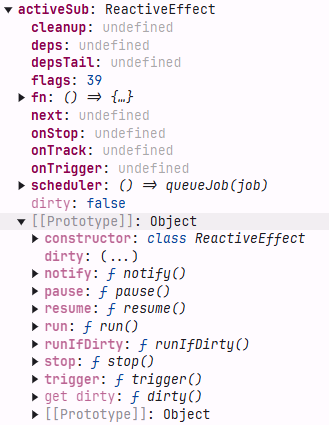
}- activeSub是一个effect文件中的全局变量,用来记录所有的副作用映射关系
eg
<script setup>
import { ref } from 'vue'

const count = ref(0)
</script>

<template>
  <button @click="count++">{{ count }}</button>
  <div id="count-2">{{ count }}</div>
  <div id="count-3">{{ count }}</div>
</template>

<style>
button {
  color: red;
}
</style>
这个例子中,count变量会触发依赖追踪三次。
这三次触发依赖追踪,都有什么样的区别
这三次触发依赖追踪本质上是相同的,但它们属于同一个渲染效果(render effect)中的不同访问点。让我详细解释一下:
对于这个模板:
<template>
  <button @click="count++">{{ count }}</button>
  <div id="count-2">{{ count }}</div>
  <div id="count-3">{{ count }}</div>
</template>
这三次 track 的执行顺序是从上到下的,它们的主要区别在于:
- 第一次 track(button 中的 count)
// 第一次 track 时
link = this.activeLink = new Link(activeSub, this)
// 此时 activeSub.deps 为空,所以这个 link 会成为 deps 链表的第一个节点
if (!activeSub.deps) {
  activeSub.deps = activeSub.depsTail = link
}- 第二次 track(count-2 div 中的 count)
// 第二次 track 时
link = this.activeLink = new Link(activeSub, this)
// 此时 activeSub.deps 已存在,新的 link 会被添加到链表尾部
link.prevDep = activeSub.depsTail
activeSub.depsTail!.nextDep = link
activeSub.depsTail = link- 第三次 track(count-3 div 中的 count)
// 第三次 track 时
// 与第二次类似,继续添加到链表尾部
link = this.activeLink = new Link(activeSub, this)
link.prevDep = activeSub.depsTail
activeSub.depsTail!.nextDep = link
activeSub.depsTail = link
主要区别点:
- 依赖链表的位置不同:
- 第一个成为头节点(deps)
- 第二个和第三个分别追加到尾部(depsTail)
- Link 对象的关联关系不同:
- 第一个 link 的 prevDep 为 undefined
- 后续的 link 会与前一个 link 建立双向链接
- 在开发环境下的调试信息:
- 每次 track 时的调用栈位置不同
- 对应的模板位置不同
但它们有以下共同点:
- 都属于同一个渲染效果(同一个 activeSub)
- 都追踪同一个响应式数据(count)
- 当 count 发生变化时,这三个位置都会触发更新
这种依赖追踪的设计使得:
- Vue 能够精确知道哪些模板位置依赖了这个响应式数据
- 当数据变化时能够精确地更新相关的 DOM 节点
- 通过双向链表结构,可以高效地管理和清理依赖关系
Vue是如何知道那些模板位置依赖了这个响应式数据的?它是怎么讲两者联系起来的?
让我解释 Vue 是如何将模板位置和响应式数据关联起来的:
核心机制是通过"副作用(Effect)"作为桥梁。当 Vue 编译模板时,会为整个组件创建一个渲染函数,这个渲染函数会被包装在一个 Effect 中。
让我们通过一个简化的例子来说明:
<template>
  <button>{{ count }}</button>
</template>
Vue 会将这个模板编译成类似这样的渲染函数:
// 简化的渲染函数示意
function render() {
  return h('button', null, count.value)  // 访问 count.value 时会触发 track
}

// 创建渲染 effect
const effect = new ReactiveEffect(render, {
  scheduler: queueJob,
  scope: componentScope,
  // ...其他配置
})
关联过程如下:
- 创建依赖关系:
// 当执行 render 函数时
count.value  // 触发 get 操作
↓
track(target, TrackOpTypes.GET, 'value')  // 进入 track 函数
↓
dep.track()  // dep 是与 count.value 关联的 Dep 实例
↓
// 在 Dep 类中创建 Link
link = new Link(activeSub, this) // activeSub 就是当前的渲染 effect- 双向链接:
// Dep 和 Effect 之间建立双向链接
// Effect 侧
effect.deps = link        // effect 记录它依赖了哪些响应式数据
effect.depsTail = link

// Dep 侧
dep.subs = link // dep 记录哪些 effect 依赖了它- 更新触发:
// 当 count.value 改变时
count.value = newValue
↓
trigger(target, TriggerOpTypes.SET, 'value')
↓
dep.notify()  // 通知所有依赖的 effects
↓
// 遍历所有 links,调用对应的 effect
for (let link = this.subs; link; link = link.prevSub) {
  link.sub.notify()  // sub 就是 effect
}
关键点:
- 位置追踪:
- 渲染函数本身就包含了模板位置信息
- Effect 在执行时会建立与具体 DOM 节点的关联
- 当数据变化触发重渲染时,会更新对应的 DOM 节点
- 依赖管理:
class Link {
  version: number
  nextDep?: Link   // 用于 Effect 的依赖链表
  prevDep?: Link
  nextSub?: Link   // 用于 Dep 的订阅者链表
  prevSub?: Link

  constructor(
    public sub: Subscriber,  // Effect
    public dep: Dep         // 响应式数据的 dep
  ) {
    // ...
  }
}- 精确更新:
- 每个响应式数据都知道哪些 Effect 依赖它(通过 dep.subs)
- 每个 Effect 都知道它依赖哪些数据(通过 effect.deps)
- 数据变化时,只会触发相关的 Effect 更新
这种机制确保了:
- 响应式数据和模板位置之间的精确关联
- 高效的依赖追踪和更新
- 最小化不必要的重渲染
文章评论区
来过,就留下你的脚印吧~